MCEqual: System-wide Android EQ for car and headphone audio
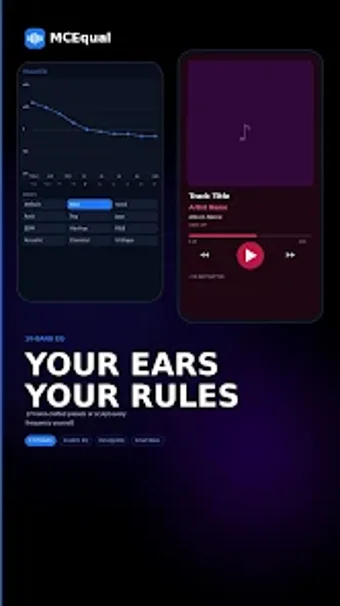
MCEqual - EQ for Android, developed by corelogiclabs, is a system-wide equalizer that improves device audio across music and video apps. The app applies a 10-band graphic equalizer, bass boost, virtualizer, and reverb presets to shape frequency response and perceived space during playback. It supports global audio routing, auto-start on media sessions, and custom preset management for repeated configurations. Audiophiles, car audio users, and frequent headphone listeners gain tailored sound control without root access. The app is lightweight and designed for background use.
Unlock your creativity with Adobe Stock
Get 10 images or 1 video with a free trial
What does MCEqual actually do during playback?
The app acts as a system-wide audio processor, applying a 10-band graphic equalizer, Bass Boost, Virtualizer, and selectable reverb presets to output from any media source. Those effects engage automatically when a media session begins via auto-start, and users can save or load custom presets for particular listening setups. This approach changes frequency balance and perceived spatial depth for music, videos, and in-car playback without altering individual player settings.
What apps and outputs does the app support?
MCEqual routes audio globally so playback from common streaming services and hardware outputs is processed without extra configuration. The tool works with popular players such as Spotify, YouTube Music, and SoundCloud, and it applies to wired headphones, Bluetooth headsets, and integrated car audio systems. No root access is required for operation; core features run on devices with Android 5.0 or higher while some advanced routing needs newer OS releases.
How approachable is configuration for casual users?
The interface exposes ten band sliders and effect toggles in a compact layout that helps nontechnical listeners craft sound profiles. Preset management lets users save and recall named configurations for different environments, and auto-start applies the chosen profile when media begins. Android's battery optimization can interrupt background processing, so excluding the app from battery optimization prevents unexpected stops and keeps presets active across sessions.
Who benefits most from on-device processing and car integration?
The app fits listeners who want hands-on tonal control: audiophiles shaping low-end response, car audio enthusiasts tuning vehicle sound, and headphone users seeking clearer mids and bass. Its internal architecture is optimized for car integration and the developer reports a lightweight background footprint that reduces battery strain while running. Community feedback highlights improved bass and clarity on budget speakers, positioning the app as a practical upgrade over many stock equalizers.
Practical choice for consistent on-device audio tuning
MCEqual is a pragmatic option for audiophiles, car audio enthusiasts, and headphone users who want consistent playback shaping across apps. The main trade-off is that a few advanced routing capabilities rely on more recent Android releases, which may limit some devices. For users prioritizing reliable background processing and clearer loudspeaker or headphone output, the app delivers a measurable upgrade over stock equalizers.
Pros
10-band graphic equalizer for precise frequency shaping
Auto-start applies EQ when a media session begins
Global audio routing processes Spotify and YouTube Music playback
Laws concerning the use of this software vary from country to country. We do not encourage or condone the use of this program if it is in violation of these laws. Softonic may receive a referral fee if you click or buy any of the products featured here.